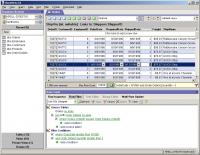
Use OmniView to speed through SQL Server or MSDE databases. Examine, add, edit, or delete data using a spreadsheet interface, or create queries with a simple point-and-click interface. All without writing any SQL statements.
Not just another visual query tool, OmniView is an advanced data manipulation application which lets users with a wide range of skill levels work with SQL Server or MSDE database content quickly and easily. DBAs and developers can examine and change data more rapidly and conveniently with OmniView than with the native tools provided with SQL Server. But less technically-skilled users can benefit from OmniView as well: project managers, QA teams, technical support staff, trainers?and sometimes even customers. Often these users are not as proficient with the more developer-centric SQL Server tools, but OmniView increases their productivity and reduces DBA support workload.
* Quick and easy access to table data using a familiar spreadsheet-like grid.
* Add, edit, or delete data in-place, without knowing any SQL.
* Filter data with point-and-click selection of fields, operators, and values. Or use complete SQL syntax. It's your choice.
* Save time changing text or binary data with full-featured editors specially suited for BLOB data.
* Organize database tables into groups that you define; keep frequently used or related tables bundled together for quick and easy access.
* Create private views of data to your specifications...the rows and columns you want to see, in the format you want to see them...and recall the view at any time with a simple mouse click.
* Save time adding new rows which are substantially similar to existing rows using the "copy row" feature...saving you from manually rekeying similar data.
* Export table data or query results to Excel, XML, HTML, or text files.
* Print formatted reports of selected data.Operating system: Win95,Win98,WinME,WinNT 4.x,Windows2000,WinXP,Windows2003 Release notes: Minor Update
MSSQL to MySQL database converter software converts MSSQL database, even tables are stored at new location or overwrite the existing MySQL database. MSSQL to MySQL table migration utility converts table and stores that database at specified location.
Price: $45, Rating: 8.33, Downloads: 195 Download
Do you have such kind experience that you can not view the complete SQL Script because of the reason with "WITH ENCRYPTION" when you view the Stored Procedure, View, Trigger and Function of MS SQL SERVER? If yes, the DecrypSQL can help you.
Price: $79.95, Rating: 9, Downloads: 148 Download

 OmniView 2.3 details